
Photo taking help for a DSLR beginner

Users who are viewing this thread

purpledove

Seizing Life ♥
Messages
4,946
Reaction score
0
Tokenz
0.00z
I own a Canon EOS 7D and only have a 28-135 mm lens for the meantime. I took a few shots in San Diego. Some shots came out great but the following are my problem shots. I know I could have taken these shots in automatic mode but i know I would be shelving the features/capabilities of a DSLR if I do. What could've I done to take a better shot ?? Any suggestion is appreciated :)

****From the LCD btw, these shots looked okay until i downloaded them in the laptop and to my disappointment :(

With me still learning the settings/features of the camera, I used these settings: ISO: 100 , 1/100 sec, f/5.6


1)I wanted to get a clearer detail on the building's design and the bronze organ to stand out more
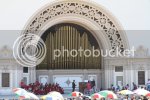
IMG_0421.jpg


2) my aim was to get the detailed design of this building too..
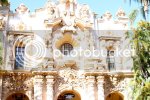
IMG_0410.jpg


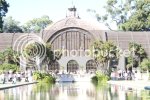
3) the color of the trees are a lot greener (same kind of green as the tree on the left upper side) and the building too in actual view is a lot browner...more of like a rusty colored brown and it came out this color. I also was aiming at having the building be mirrored into the water but i failed :p IMG_0414.jpg

4) same thing: details of the design on the building is what i wanted to see on the shot.
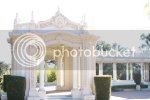
IMG_0428.jpg

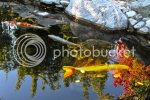
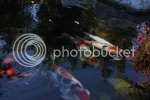
5) Is there a technique to take a pic of the koi at same time show the reflection of the trees/sky on the water?
IMG_0456.jpg


IMG_0450.jpg
 
  • 49
    Replies
  • 1K
    Views
  • 0
    Participant count
    Participants list

porterjack

Valued Contributor
Valued Contributor
Messages
10,935
Reaction score
305
Tokenz
0.11z
Get ready

Lots of opinions round here when it comes to cameras/photography
I dont have one btw
Good luck
 

Tuffdisc

Well-Known Member
Messages
10,024
Reaction score
1
Tokenz
20.23z
1-4 evidently overexposed (no offence) How to remedy this.....erm, you should try go to f/16 (there is a reason why it is called the "sunny f/16"), and don't ever point the camera/lens to where the sun is. or directly above you...a big no, no
5-6 you are not using selective AF points (I am assuming you are using auto AF point) This requires you to read the manual on how to select the ones you want
 

purpledove

Seizing Life ♥
Messages
4,946
Reaction score
0
Tokenz
0.00z
1-4 evidently overexposed (no offence) How to remedy this.....erm, you should try go to f/16 (there is a reason why it is called the "sunny f/16"), and don't ever point the camera/lens to where the sun is. or directly above you...a big no, no
5-6 you are not using selective AF points (I am assuming you are using auto AF point) This requires you to read the manual on how to select the ones you want

No offence taken, am here to learn.

It was very sunny then and i avoided pointing the camera to where the sun is. Played with the settings and it made it worse. And yes I had been reading on my manual and still struggling with it's many buttons. I even have that book Canon EOS 7D for dummies :p

I'll keep the f/16 in mind. All I knew from reading was that with sunny shots, the sweet spots I think they call is between F11-F16. I forgot how to change the aperture then and also didn't have the manual with me :(
 

Tuffdisc

Well-Known Member
Messages
10,024
Reaction score
1
Tokenz
20.23z
No offence taken, am here to learn.

It was very sunny then and i avoided pointing the camera to where the sun is. Played with the settings and it made it worse. And yes I had been reading on my manual and still struggling with it's many buttons. I even have that book Canon EOS 7D for dummies :p

I'll keep the f/16 in mind. All I knew from reading was that with sunny shots, the sweet spots I think they call is between F11-F16. I forgot how to change the aperture then and also didn't have the manual with me :(

If this f/16 doesn't work, try different settings on the f/stop, digital is there to learn :)

That is why some people carry their manual always (though I don't, though I should for the necessary technical side)

Page 87-92 of your manual is also of particular interest to your thing on the Koi, though it will take some time to getting used to that, even my camera hasn't got those features :eek
 

purpledove

Seizing Life ♥
Messages
4,946
Reaction score
0
Tokenz
0.00z
If this f/16 doesn't work, try different settings on the f/stop, digital is there to learn :)

That is why some people carry their manual always (though I don't, though I should for the necessary technical side)

Page 87-92 of your manual is also of particular interest to your thing on the Koi, though it will take some time to getting used to that, even my camera hasn't got those features :eek

I have read on those AF points and am not sure if I was on auto then or not. But you're right the camera has those many AF points and al siervo (i think) etc which is so cool if I learn to use them. I have watched a video of it on youtube.

Here is a site for learning about the histogram...I noticed in photoshop that your histogram is shifted more to the right (overexposure) than slap bang in the middle

I see what you mean on the histogram now ( helpful piece of info) and yup, i see the spikes of overexposure on the graph shown per each pic. I'll have to learn/remember to use the exposure compensation button too :nod:
 

darkcgi

Glorified Maniac
Messages
7,475
Reaction score
448
Tokenz
2.25z
attachment.php

attachment.php

attachment.php

attachment.php

attachment.php

attachment.php
 

Tuffdisc

Well-Known Member
Messages
10,024
Reaction score
1
Tokenz
20.23z
I have read on those AF points and am not sure if I was on auto then or not. But you're right the camera has those many AF points and al siervo (i think) etc which is so cool if I learn to use them. I have watched a video of it on youtube.


I see what you mean on the histogram now ( helpful piece of info) and yup, i see the spikes of overexposure on the graph shown per each pic. I'll have to learn/remember to use the exposure compensation button too :nod:

Start on AI Focus first rather than AI Servo. AI Servo is the demon of focusing world, even I have difficulties with it sometimes :)
 

Guyzerr

Banned
Messages
12,928
Reaction score
0
Tokenz
0.00z
Start on AI Focus first rather than AI Servo. AI Servo is the demon of focusing world, even I have difficulties with it sometimes :)

PD I'm just adding to what Tuffy said.

What I use as a rule.............

- ISO as required for lighting conditions. The lower the better but don't forget your 7D handles higher settings quite well and if you end up with a bit more noise than you would like a decent photo editor can help you out.

- AI Focus if the target and the shooter are not moving. Use either auto mode or Av ( once you become more familiar with your camera ) . Use your histogram and adjust your apature by 1/4 stops if you have the time. Try and find a place with shade to view your shots. You're more likely to see the real outcome. Most of the time you'll probably be over exposed and those shots are harder to " fix " once you are at home. Always try and do it with the camera if you can. Editing is ok but it's not the best way to get the shot if you know what I mean.

- AI Servo if the target is moving regardless of me moving or not. IE: Birds or aircraft in flight and me panning them.............. but........... select only one focal point ( usually the center one ) and make sure you have it on your subject at all times with your trigger half depressed so it will lock on and say locked on the subject. This is where you have to select a decent shutter speed selected depending on your subject and have your camera on Tv. Lot's of pro shooters are able to use manual mode but I haven't been able to master that yet and it beats me how they can do it. Make sense?

With the building shots it looks like you were facing the sun. That makes it real tough to get a decent shot regardless of how hard you try. Sometimes you can't avoid it but try and keep the sun on your back. If I see conditions like that I usually don't even bother taking the shot.

Hint... on your fish shots a circular polarizing filter would have helped a lot I think. It cuts down the glare on the water. I just skimmed these links but if you have the time to read 'em they might help you understand how they work and what they actually do.

http://www.dslrtips.com/workshops/How_to_use_polarizing_filters/reduce_haze_deep_blue_sky.shtml

http://www.advancedphotography.net/circular-polarizer-filter-circular-polarizer-filter/
 

purpledove

Seizing Life ♥
Messages
4,946
Reaction score
0
Tokenz
0.00z
Start on AI Focus first rather than AI Servo. AI Servo is the demon of focusing world, even I have difficulties with it sometimes :)

Nah am not concentrated on the AI Servo yet. Maybe soon :nod:

PD I'm just adding to what Tuffy said.

What I use as a rule.............

- ISO as required for lighting conditions. The lower the better but don't forget your 7D handles higher settings quite well and if you end up with a bit more noise than you would like a decent photo editor can help you out.

- AI Focus if the target and the shooter are not moving. Use either auto mode or Av ( once you become more familiar with your camera ) . Use your histogram and adjust your apature by 1/4 stops if you have the time. Try and find a place with shade to view your shots. You're more likely to see the real outcome. Most of the time you'll probably be over exposed and those shots are harder to " fix " once you are at home. Always try and do it with the camera if you can. Editing is ok but it's not the best way to get the shot if you know what I mean.

Good points :nod:

Am thinking if I made the mistake to getting complacent taking the shots just viewing thru LCD. My hands were steadier that way than viewing thru eyepiece viewfinder while holding the camera. Plus, you're right I wasn't in a totally shaded area pre-viewing the shots.

AI Servo if the target is moving regardless of me moving or not. IE: Birds or aircraft in flight and me panning them.............. but........... select only one focal point ( usually the center one ) and make sure you have it on your subject at all times with your trigger half depressed so it will lock on and say locked on the subject. This is where you have to select a decent shutter speed selected depending on your subject and have your camera on Tv. Lot's of pro shooters are able to use manual mode but I haven't been able to master that yet and it beats me how they can do it. Make sense?

Yup, it makes total sense and shall keep those in mind :nod:

At this time, I shall not confuse myself more with the Al Servo. I am looking forward to learning these 19 AF Points and many variations of it in the future

With the building shots it looks like you were facing the sun. That makes it real tough to get a decent shot regardless of how hard you try. Sometimes you can't avoid it but try and keep the sun on your back. If I see conditions like that I usually don't even bother taking the shot.

Heh, California as the always sunny State :p The sun at this time was on my right side while facing that building. I was thinking maybe the way I tilted the camera upwards as I didn't have that much room to back out and zoom to get a good shot might have allowed the camera to get that much light into the lens. I wasn't really facing the sun :trustme :tooth

Ooops forgot about the CPL filter....would cut out a lot of the highlights, but you would have to adjust the CPL filter yourself to make it right for you
http://www.great-landscape-photography.com/polarizing-filter.html

The CPL filter is constructed in a weird way, filter ring to fit on your lens, and another layer which to turn around, you will see the effect it has

Good reading on all those links. Thanks to both :thumbup

I had also learned a lot from Aperture Academy site. I was planning of joining some of their landscape workshops soon, but quite expensive at $500+ :eek

http://www.apertureacademy.com/how-to-better-landscape-photos.php


At the bottom of this discussion are points on filters and you guys are right, it also recommends polarized filter. In simple terms, it discussed the different filters and landscape photo taking techniques. Lots to learn.
 

Guyzerr

Banned
Messages
12,928
Reaction score
0
Tokenz
0.00z
Btw- Aperture academy is in Facebook too and they always have good tips posted

http://www.facebook.com/ApertureAcademy?sk=app_2309869772

I've read that RAW shots are better. In your experience, does it really make a difference and what are the Pros and cons.

I never shot in JPEG. He's a little blurb about it. I haven't read it so I can't say how valid the points are.

Another thing if I may be so bold. Try and use the eyepiece instead of the LCD when you shoot. You might have better luck.
 

purpledove

Seizing Life ♥
Messages
4,946
Reaction score
0
Tokenz
0.00z
I never shot in JPEG. He's a little blurb about it. I haven't read it so I can't say how valid the points are.

Another thing if I may be so bold. Try and use the eyepiece instead of the LCD when you shoot. You might have better luck.

I changed the settings to RAW now.

And I don't mind you being bold. Imo, it's better than keeping it to yourself. I need to know where I was wrong hence it's okay. I'll use the eyepiece from now on. The LCD was juz so convenient and pre- shots are clear :tooth

Thanks for all the help :thumbup
 
80,546Threads
2,194,791Messages
5,014Members
Back
Top


