
You are using an out of date browser. It may not display this or other websites correctly.
You should upgrade or use an alternative browser.
You should upgrade or use an alternative browser.
Another: Post Your desktop Thread
- Thread starter Dana
- Start date
Users who are viewing this thread
Total: 2 (members: 0, guests: 2)


-
48Replies
-
1KViews
-
0Participant count
-
Participants list

Springsteen
Number 2, Rafael!
Pinned for you.
Here's mine.

(Click it)
Here's mine.
(Click it)


Grimousetie
Member
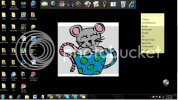
And yes, I totally have a sticky-note with a list of my Survivor team mates for reference, lol.
I drew the mouse. =)

AstriaPorta
Well-Known Member
My Desktop 

AstriaPorta
Well-Known Member
I format the computer and done some changes so here what i have now still fixing some stuff not done completly


Peter Parka
Well-Known Member
Can someone give me a step by step guide to doing a screen shot of it again? I've forgotten how. Rep (my rep is worth a lot) to the first person who does and whose instructions work.:thumbup
Springsteen
Number 2, Rafael!
Right first press Print Screen (there should be a button for it on your keyboard), then go to Paint (Start, accessories, Paint), in there at the top press Edit, Paste and the image will come onto the screen. Save that then come here, go advanced, then click on the attachments button, get the image from your Computer from there and upload it to here.
Peter Parka
Well-Known Member
Cant see a print screen button, what does it look like?
Springsteen
Number 2, Rafael!
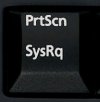
Could look like that.
Peter Parka
Well-Known Member
Lets see if this works...
Springsteen
Number 2, Rafael!
Thanks for the rep

Dame of Fail
Member
hmmm, I don't know how to post my desktop but I do know how to post the pic that's on my desktop...(I know, I know, I fail).



TheFireMan
Member
here's mine....
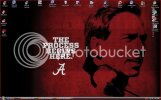


Last edited by a moderator:



80,546Threads

2,194,732Messages

5,014Members