There's one rule to this thread and as Guy put it so well, I'll repeat it:
Don't post anything not pertaining to the subject. I don't want to see a helpful thread become cluttered. Thanks for your understanding.
My hope is that this thread will be of some help to those out there who'd love to learn more about their camera or photography in general.
We can get as technical or as simple as required and everyone with an interest in photographs is welcome to ask questions or post their own tips and tricks.
Naturally it will be geared more towards the digital crowd but folks such as Janie who would like to share their tips on film photography are of course welcome to.
Obviously I won't cover everything in one thread so I'll start with a couple of things and as per Guy's suggestion - feel free to post a picture you've got an issue along with the EXIF data and I'm sure if not just from the picture itself but from the EXIF there'll be suggestions for improving the shot.
EXIF?
Well, it stands for exchangeable imagefile format and will allow you to see various metadata such as camera settings for example.
The following image should help you see what I mean. It's taken from one of my Joshua Tree shots:
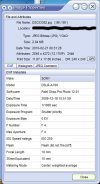
I used FastStone Image Viewer to grab that information (by pressing 'I' when an image is selected). It's free, lightweight and has a variety of useful photo functions. Of course - Windows or any decent os or photo package should also provide the same information if not always in as concise a format.
For now, let's take one of those settings - aperture.
Aperture.
The best way to describe aperture is to think of your camera lens as the pupil in the human eye. The bigger the aperture (or opening) - the more light can reach your camera's sensor.
The aperture of your camera lens is expressed in terms of something called F-stops. This can be seen on camera lenses as figures such as F/3.5, F3.5 etc.
Lenses can come in fixed apertures or as a range of apertures. Chances are that if you have a point and shoot type camera, the lens will have a range of apertures.
As for the numbers - the lower the number - the bigger the aperture and therefore the more light it will let in. E.g. some of the fastest lenses that will capture the most light come with an F-stop of F1.4 (there are faster - this is just an example).
A small idea of an F-stop range is the following:
F2.8
F4
F5.6
F8
A lens set at an F-stop value of say F2.8 will let in twice as much light as the same lens set at F4 for example. You're not normally restricted to change F-stop values in full increments as per the example range I've listed - you can often change F-stop values in half or third increments too.
The most important thing to remember about the F-stop number is bigger = less light reaching your camera sensor. This means that if you want to take shots in low light conditions - it's most useful if you have a lens that has as low an F-stop value as possible. Low F-stop = larger aperture.
The other important thing to consider about aperture is that it also controls depth of field. I'll take and post example pictures if wanted but lets consider this for a moment.
Depth of field
What would you like to appear in focus and sharp in your picture? Imagine you want to take a picture of some flowers in a field. You set your aperture to say F2.8 and focus in on a bunch of flowers and capture that. They are sharp and in focus but the rest of the soil and say field appear blurry. From the same position you take the same picture but at an aperture of F8. Now, the bunch of flowers and most of the field (if not all) will appear sharp and in focus.
Depth of field can be used creatively to enhance your shots.
I'll leave it there for now but please feel free to add your own insights or ask questions. It might not be me replying - but you will get an answer to a question I'm sure by any of the photographers here.
Don't post anything not pertaining to the subject. I don't want to see a helpful thread become cluttered. Thanks for your understanding.
My hope is that this thread will be of some help to those out there who'd love to learn more about their camera or photography in general.
We can get as technical or as simple as required and everyone with an interest in photographs is welcome to ask questions or post their own tips and tricks.
Naturally it will be geared more towards the digital crowd but folks such as Janie who would like to share their tips on film photography are of course welcome to.
Obviously I won't cover everything in one thread so I'll start with a couple of things and as per Guy's suggestion - feel free to post a picture you've got an issue along with the EXIF data and I'm sure if not just from the picture itself but from the EXIF there'll be suggestions for improving the shot.
EXIF?
Well, it stands for exchangeable imagefile format and will allow you to see various metadata such as camera settings for example.
The following image should help you see what I mean. It's taken from one of my Joshua Tree shots:
I used FastStone Image Viewer to grab that information (by pressing 'I' when an image is selected). It's free, lightweight and has a variety of useful photo functions. Of course - Windows or any decent os or photo package should also provide the same information if not always in as concise a format.
For now, let's take one of those settings - aperture.
Aperture.
The best way to describe aperture is to think of your camera lens as the pupil in the human eye. The bigger the aperture (or opening) - the more light can reach your camera's sensor.
The aperture of your camera lens is expressed in terms of something called F-stops. This can be seen on camera lenses as figures such as F/3.5, F3.5 etc.
Lenses can come in fixed apertures or as a range of apertures. Chances are that if you have a point and shoot type camera, the lens will have a range of apertures.
As for the numbers - the lower the number - the bigger the aperture and therefore the more light it will let in. E.g. some of the fastest lenses that will capture the most light come with an F-stop of F1.4 (there are faster - this is just an example).
A small idea of an F-stop range is the following:
F2.8
F4
F5.6
F8
A lens set at an F-stop value of say F2.8 will let in twice as much light as the same lens set at F4 for example. You're not normally restricted to change F-stop values in full increments as per the example range I've listed - you can often change F-stop values in half or third increments too.
The most important thing to remember about the F-stop number is bigger = less light reaching your camera sensor. This means that if you want to take shots in low light conditions - it's most useful if you have a lens that has as low an F-stop value as possible. Low F-stop = larger aperture.
The other important thing to consider about aperture is that it also controls depth of field. I'll take and post example pictures if wanted but lets consider this for a moment.
Depth of field
What would you like to appear in focus and sharp in your picture? Imagine you want to take a picture of some flowers in a field. You set your aperture to say F2.8 and focus in on a bunch of flowers and capture that. They are sharp and in focus but the rest of the soil and say field appear blurry. From the same position you take the same picture but at an aperture of F8. Now, the bunch of flowers and most of the field (if not all) will appear sharp and in focus.
Depth of field can be used creatively to enhance your shots.
I'll leave it there for now but please feel free to add your own insights or ask questions. It might not be me replying - but you will get an answer to a question I'm sure by any of the photographers here.

 can you post examples of each of the subjects - maybe a photo taken on two different apertures (to demonstrate light) and maybe one with deep v. shallow depth of field?