
You are using an out of date browser. It may not display this or other websites correctly.
You should upgrade or use an alternative browser.
You should upgrade or use an alternative browser.
Mucking About With HDR... ( big post )
- Thread starter Guyzerr
- Start date
Users who are viewing this thread
Total: 2 (members: 0, guests: 2)
-
176Replies
-
4KViews
-
0Participant count
-
Participants list


That's kinda what I was thinking. The nice thing is they aren't overdone imo.I love the shots of the planes, guyz! And I think the HDR effect really makes them pop!
:thumbupSounds good.. Either day will be good for me next week.
PS I plan to just go out and shoot picture of that Moon tonight with Francis as the skies are nice and clear.. ( this was just for Zirc to be on topic) so may be you and I can look at them then..
I'm waiting for it to come up because it's fairly clear here. Kinda hazy though due to the high humidity. Now if I happen to get lucky and get a decent shot we can compare when we scarf down breakfast.
No point posting them here. Is it the effect or the planes that caught your attention? Just curious.The planes do look good - I like the first and last ones best
Your flower shot came out decent considering you used your cell. The last post kinda looks like it has a bit of a mild sepia filtered effect. :thumbup
One of the unfortunate things about these programs is they sure seem to make the noise stand out don't they.
That's kinda what I was thinking. The nice thing is they aren't overdone imo.
I agree. I think it brings out the clarity without making it look fake. I like how you can see more detail that way.
And the clouds look really nice in the back, too.
The water ones are fabulous.
absolutely

Thank Coolie....Guy, the day that I get married, you are going to be there. Because you take AMAZING pictures! I love them!

purpledove
Seizing Life ♥
I had been trying HDR and the attached is what i played with (taken with a P&S). However I had been reading more on it and am so confused about luminance and exposure values (Ev). The author gave these information:
DSLR: dr=300:1 or 7.0EV
Luminance values:
Star light = 0.001:1
Moon light = 0.1:1
Indoor light = 50:1
Sunny sky = 100,000:1
How do i incorporate these values into getting a higher dynamic range? I am aware of the limitations as to having a 1/2 sensor compared to full frame/sensor camera. But how does one use these values to come up with ISO, shutter speed and aperture settings while taking shots?
Original ( taken with a P&S a few years back )
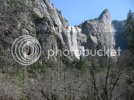
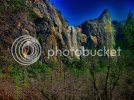
HDR ( I know i still need lots of improvement esp halos i think which made that pattern on the sky )
http://s1221.photobucket.com/albums/dd465/fireblossom3/?action=view¤t=yosemite1-2.jpg
DSLR: dr=300:1 or 7.0EV
Luminance values:
Star light = 0.001:1
Moon light = 0.1:1
Indoor light = 50:1
Sunny sky = 100,000:1
How do i incorporate these values into getting a higher dynamic range? I am aware of the limitations as to having a 1/2 sensor compared to full frame/sensor camera. But how does one use these values to come up with ISO, shutter speed and aperture settings while taking shots?
Original ( taken with a P&S a few years back )
HDR ( I know i still need lots of improvement esp halos i think which made that pattern on the sky
)http://s1221.photobucket.com/albums/dd465/fireblossom3/?action=view¤t=yosemite1-2.jpg
Last edited by a moderator:

pinkporridge
V.I.Pinkporridge
I havent done any HDR and dont know a thing about it. so on this occasion i cant help :/
pinkporridge
V.I.Pinkporridge
only i do know a pretty cool metalic effect on photoshop that i have found works quite well on portraits. Would post porb work on landscape too. It can make things look a little HDR.
I had been trying HDR and the attached is what i played with (taken with a P&S). However I had been reading more on it and am so confused about luminance and exposure values (Ev). The author gave these information:
DSLR: dr=300:1 or 7.0EV
Luminance values:
Star light = 0.001:1
Moon light = 0.1:1
Indoor light = 50:1
Sunny sky = 100,000:1
How do i incorporate these values into getting a higher dynamic range? I am aware of the limitations as to having a 1/2 sensor compared to full frame/sensor camera. But how does one use these values to come up with ISO, shutter speed and aperture settings while taking shots?
Original ( taken with a P&S a few years back )
HDR ( I know i still need lots of improvement esp halos i think which made that pattern on the sky
http://s1221.photobucket.com/albums/dd465/fireblossom3/?action=view¤t=yosemite1-2.jpg
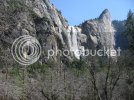
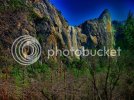
You don't have a 1/2 sensor, you have a 1.6x sensor. Regardless of you having a crop sensor or not, the exposure will be the same on a crop and full frame sensor. I don't know what software you are using for HDR, I assume its not CS5
Those "halo effects" are caused by too much contrast in the post processing of the image...

purpledove
Seizing Life ♥
You don't have a 1/2 sensor, you have a 1.6x sensor. Regardless of you having a crop sensor or not, the exposure will be the same on a crop and full frame sensor. I don't know what software you are using for HDR, I assume its not CS5
Those "halo effects" are caused by too much contrast in the post processing of the image...
Yeah i just realized that, I meant 'crop' sensor as i knew the size of my sensor
I thought though and read that full frames are able to get a higher range of dynamic light esp in landscape photography over a crop sensor? But of course with the use of software, one is able to edit that and get a higher range :tooth
This is my HDR attempt using CS5
I like it...just that area by the right top side had been my problem area. It changes color with the sky when it's not supposed to be blue
I need to learn more about HDR in CS5. Yup, i used a trial version of another software and not CS5.
purpledove
Seizing Life ♥
I havent done any HDR and dont know a thing about it. so on this occasion i cant help :/
It's okay..
only i do know a pretty cool metalic effect on photoshop that i have found works quite well on portraits. Would post porb work on landscape too. It can make things look a little HDR.
Please post, I am excited to see it and learn the technique :nod:
Yeah i just realized that, I meant 'crop' sensor as i knew the size of my sensor
I like it...just that area by the right top side had been my problem area. It changes color with the sky when it's not supposed to be blue
I need to learn more about HDR in CS5. Yup, i used a trial version of another software and not CS5.
Better low light and dynamic range

80,546Threads

2,194,778Messages

5,014Members