editing software/tips

Users who are viewing this thread

purpledove

Seizing Life ♥
Messages
4,946
Reaction score
0
Tokenz
0.00z
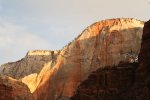
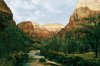
I took this shot when we went to Zion National Park last month. I really like this scenery a lot however the contrast with the sunlight still shining through on the top area of the mountains( right and middle) and the shadowing/darkened areas of the mountains and the river below....made it hard for me to get a good shot. With the way i adjusted the settings on the camera with the kind of lighting on the river and trees....it made the problem areas i mentioned has an overexposed look. I was advised in the future to take 2 different pictures and merge them. The other suggestion was to tweak existing picture at Photoshop- like a sky/over exposed app/plug-in of some sort to remedy the shot. I tried doing it via CS5 and PS elements 10 with Color Efex plug in trials to remedy it and i am struggling. I need help please....any suggestions appreciated :nod:

Btw- I am able to get the CS5 at a student price, is it much better to get that than Photoshop Elements?? I seem to get lost with CS5 due to it's many features and PE seems to be a lot simpler. So is it hard to learn CS5? I am thinking it's worth the money to get CS5 now than get the PS Elements then upgrade again soon when i get better at editing/photoshopping. Thanks mucho.

1
 
  • 27
    Replies
  • 760
    Views
  • 0
    Participant count
    Participants list

purpledove

Seizing Life ♥
Messages
4,946
Reaction score
0
Tokenz
0.00z
Two different shots of the same thing or something else and you want to stitch them together?

What i was told was- take a shot of the river and trees (1st pic)= different settings given the lighting and 2nd shot wld be the mountain and sky= bright... then stitch them together.

Is there another way just in case, i go back to Zion in the future or encounter same problem in other landscape settings?
 

Tuffdisc

Well-Known Member
Messages
10,024
Reaction score
1
Tokenz
20.22z
What i was told was- take a shot of the river and trees (1st pic)= different settings given the lighting and 2nd shot wld be the mountain and sky= bright... then stitch them together.

Is there another way just in case, i go back to Zion in the future or encounter same problem in other landscape settings?

You could that in cs5 and elements, its called........Photomerge..

How to access it via CS5 File>Automate>Photomerge
 

purpledove

Seizing Life ♥
Messages
4,946
Reaction score
0
Tokenz
0.00z
You could that in cs5 and elements, its called........Photomerge..

How to access it via CS5 File>Automate>Photomerge

I watched the tutorial on photomerge yesterday and attempted to edit that pic BUT I failed miserably :24:

Is CS5 worth the money since it's a student price rather than Elements?
 

Tuffdisc

Well-Known Member
Messages
10,024
Reaction score
1
Tokenz
20.22z
I watched the tutorial on photomerge yesterday and attempted to edit that pic BUT I failed miserably :24:

Is CS5 worth the money since it's a student price rather than Elements?


You are going to get the same result in Elements as in CS5. Elements is a stripped down version of CS5
 

purpledove

Seizing Life ♥
Messages
4,946
Reaction score
0
Tokenz
0.00z
is it something like this you're after?

6573253315_df770104e4.png

Sort of as it's a bit brighter, more vivid on the tree areas and bit of the clouds are showing....my big concern is the middle and top right mountain tops that are golden yellow in color....imo ( I guess am a perfectionist :p) there's way too much contrast given these areas are exposed to the sun and other parts are not.

Thanks for the edit. It looks nice :)

You are going to get the same result in Elements as in CS5. Elements is a stripped down version of CS5

Okay. thanks :)
 

Siphorous

Anticipation
Messages
7,001
Reaction score
17
Tokenz
199.13z
It's a nice pic. I think Ian's edit is closest to the best you'll achieve given the lighting conditions. The sun highlighting the tips looks fine and adds to the picture rather than subtract from it. Imho, it would be a more dreary picture if the the tips were photoshopped to have the same colour/shading as the non sunny bits.
 

purpledove

Seizing Life ♥
Messages
4,946
Reaction score
0
Tokenz
0.00z
I like both edits :nod: SkyBlue's due to the clouds showing more. Tuffy's captures the real colors of the actual Zion scenery as the colors are really that red and orangey.

I guess since I've seen the actual colors of the tips of the mountains even when exposed in sunlight- makes me wanna show the real colors I've seen...that makes me wanting to achieve that. The actual tips are not purely golden yellow as per my shot but combination of these colors as attached below. That maybe if those tips are less golden yellow- it would be nearer the actual colors.

6557837697_4566f2fe95.jpg
 

purpledove

Seizing Life ♥
Messages
4,946
Reaction score
0
Tokenz
0.00z
pic1.jpg

With this conversion I did for you, it looks like OTz has an Ansel Adams here :p


Haha :24: Thanks but am NOT by a looooooong shot.


Here's my friend's edit. He added some clouds too. I lost the RAW file on this shot so he worked with the Jpeg file which made editing quite limited.

IMG_0235_b.jpg
 

purpledove

Seizing Life ♥
Messages
4,946
Reaction score
0
Tokenz
0.00z
How did you lose the RAW file?

I didn't realize that after I upgraded to OS X Lion that iPhoto was a separate upgrading. Uploaded my raw files then deleted them from my camera. Only to realize, iPhoto converted it automatically to Jpeg :(

It's all good now, I've upgraded iPhoto
 

darkcgi

Glorified Maniac
Messages
7,475
Reaction score
448
Tokenz
2.25z
cs5 is the bomb
once you get it down youll be looking for plugins
get a drawing tablet
from wacom
it will make your art some much easier and fun
 

Tuffdisc

Well-Known Member
Messages
10,024
Reaction score
1
Tokenz
20.22z
I didn't realize that after I upgraded to OS X Lion that iPhoto was a separate upgrading. Uploaded my raw files then deleted them from my camera. Only to realize, iPhoto converted it automatically to Jpeg :(

It's all good now, I've upgraded iPhoto

What you should do is download it to your hard drive
 
80,414Threads
2,194,168Messages
5,011Members
Back
Top